Forward prices in the power markets are typically quoted on a monthly basis. However, it is often helpful to construct an hourly price series (whose average equals the average for the month) for use in risk management, hedging strategy decisions, and retail pricing. This post will show one way this can be done.
A simple way to construct an hourly price series from a monthly price, is to use a price scalar. This is nothing more than the historical ratio associated with a particular month and hour. For example, it answers the question: “Historically, how does hour 15 in January relate to January’s monthly average?” Note: 1) This is not a price forecast in the traditional sense – think of it as a way to estimate typical hourly deviations from the average., and 2) this is one of the most basic ways to make this estimate.
The below steps will show you how to answer the above question relying heavily on the dplyr and lubridate packages. GitHub code here.
library(dplyr)
library(lubridate)
library(ggplot2)
library(tidyr)
The Data:
First, we need to get a hold of historical price data. I’m using the PJM total LMP Western Hub price accessible from their Data Miner service. The options I’ve selected are shown in the screen shot below:

Once you have downloaded the data as a .csv file, it is time to do some data munging. The code below takes the data from wide format to long, and fixes the date to include hours.
raw_data <- read.csv('C:\\Users\\cmohan\\Desktop\\DataMiner-Export_2016-01-12-westhub.csv') %>%
  select(-VERSION,-ZONE,-PNODEID,-PNODETYPE,-PRICINGTYPE,-H2DST) %>%
  mutate(PUBLISHDATE = mdy(PUBLISHDATE)) %>%
  gather(hour,value,-PUBLISHDATE,-PNODENAME) %>%
  mutate(variable = as.numeric(substring(hour,2)) - 1,
         Date = mdy_hms(paste(month(PUBLISHDATE),day(PUBLISHDATE),year(PUBLISHDATE),hour,0,0))) %>%
  select(Date,value) %>%
  arrange(Date) %>%
  na.omit()
Now that the data is in a form we can work with, it’s time to think about what we are trying to do. The point of an hourly scalar is to take the monthly forward price and extrapolate it to hourly granularity. To do this we will need a scalar that increases or decreases the monthly forward price based on the historical relationship between the monthly average price and each particular hour.
I am focusing on three subsets or types of hourly power scalars: On Peak, Off Peak, and Weekends.

With this type of grouping, each hour will have two different scalars depending on whether the day is in the workweek or on the weekend (or holiday).
Calculating the Scalar:
So, the first thing we need to do is add a ‘type’ column to the historical price data to identify each hour as either On Peak, Off Peak, or Weekend. The below code will create this type column.
  filtered_data  <- raw_data %>%
    mutate(value = as.numeric(value),
           type = ".",
           type = ifelse(wday(Date) %in% seq(2,6) & hour(Date) %in% seq(7,22),'OnPeak','OffPeak'),
           type = ifelse(wday(Date) %in% c(1,7), 'WeekEnd',type)
    )

  types <- c('OnPeak','OffPeak','WeekEnd')
Now we have each hour in the historical data set labeled as OnPeak, OffPeak, or Weekend (For simplicity, holidays are being ignored). The next step is to 1) split the dataframe by year, 2) calculate the average of each month, and 3) divide each hour by the monthly average. These three steps need to be looped over for each month and type. (there’s probably a way to do this all with apply functions, suggestions are more than welcomed)
    out <- list()
        # for each month
        for(m in 1:12){
        # for each type
        for (t in 1:3 ){
          fdata <- filter(filtered_data,type == types[t],month(Date) == m)

          by_year <- split(fdata, year(fdata$Date))
          pct_of_mean <- lapply(by_year, function(x)  mutate(x,value = value/mean(value)))
          s <- do.call(rbind, pct_of_mean)

          name <- paste(types[t],':', month(m, label = TRUE),sep="")

          out[[name]] <- s
        }

      }

    all <- do.call(rbind,out)
The ‘all’ data.frame contains all the scalars by hour, all we need to do is summarize this by month, hour, and type. The code below does just that.
  scalars <- arrange(all) %>%
             mutate(month = month(Date),hour = hour(Date))%>%
             group_by(month,hour,type) %>%
             summarize(scalar = mean(value)) %>%
             ungroup()
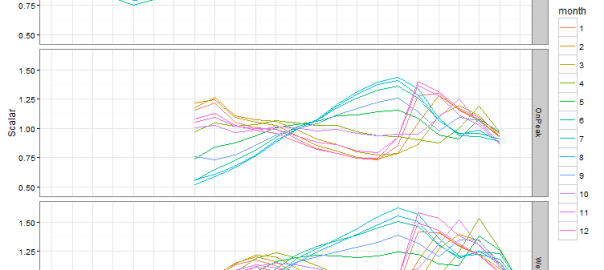
Now we can chart the results.
  ggplot(mutate(scalars, month = as.factor(month), hour = as.factor(hour)),       aes(x = hour, y = scalar,group = month)) +
    geom_line(aes(colour = month)) +
    scale_y_continuous(breaks = seq(-2,2,by = .25),'Scalar') +
    facet_grid(type~.) +
    theme_bw()
Using the scalar:
Now that we have scalars, let’s use them. Say we want to create an hourly shaped price for August 2016. The first thing to do is create dates we want to forecast.
  dates <- data.frame(date = seq(ymd_h('2016-08-01-0'),ymd_h('2016-08-10-23'), by = 'hours')) %>%
    mutate(month = month(date),
           hour = hour(date),
           type = ".",
           type = ifelse(wday(date) %in% seq(2,6) & hour(date) %in% seq(7,22),'OnPeak','OffPeak'),
           type = ifelse(wday(date) %in% c(1,7), 'WeekEnd',type))
And we need a forward price for West Hub in August.
forwardPrice <- data.frame(month = 8, type = c('OnPeak','OffPeak','WeekEnd'),price = c(52,35,32))
With a few left joins we can easily get an hourly representation of the monthly price for the first 10 days in August 2016.
  fcast <- Reduce(left_join,list(dates,scalars, forwardPrice)) %>%
    mutate(fcast_price = scalar * price)

  ggplot(fcast, aes(x= date, y = fcast_price)) +
    geom_line() +
    theme_bw()

 QuantDeep